

The basics
Financial advice is rooted in trust. Clients trust you with their life savings, so first impressions are everything. Even if you’re the most skilled adviser, an outdated website can limit your ability to convey that expertise at scale.
A fast, well-designed, modern website signals credibility, professionalism, and care. It sets the foundation for trust, helping clients feel confident in your guidance from the first impression.
We understand that advisers have a lot on their plate and struggle to convey their value to clients online. We developed a digital solution that helps you convert leads and elevate your existing client’s journey while being easy to manage after launch.
With firsthand experience and a targeted focus on the financial advice industry, we understand your unique needs. We create websites with smart functionality and thoughtful design, streamlining operations, improving client and internal processes.
WordPress provides the perfect blend of flexibility, ease of use, extensive functionality, and scalability, making it ideal for advice practices. It empowers firms to manage their own updates and content if they choose, and supports seamless design, publishing, and maintenance.
With over 43% of top websites running on WordPress, including major brands like Microsoft and eBay, it commands 63% of the global Content Management System (CMS) market (W3Techs, 2024). A CMS is software that lets you build and manage website content without coding, making WordPress a trusted choice for businesses worldwide.
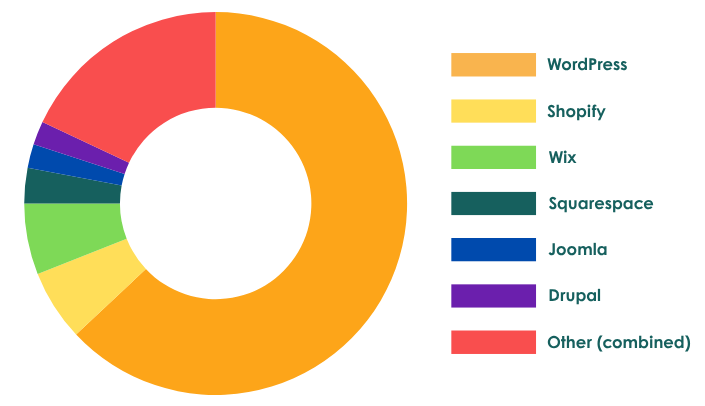
Compared to platforms like Squarespace, WordPress offers greater customisation, more advanced functionality, and access to thousands of plugins for everything from SEO to client portals. Unlike Squarespace, which can be limiting, WordPress is open-source and constantly evolving, providing a site that can grow with your business needs.
Simply Advice Websites builds on WordPress to deliver sites that are both robust and adaptable, so you’re never restricted by the platform.
Working with an experienced, professional team offers long-term benefits that go beyond just getting your site live. Like insurance or super, getting it right the first time saves heartache down the road.
DIY or cheaper alternatives may seem appealing, but they often become time-consuming, stressful, prone to errors, fail to cover the maintenance of your site, have low functionality ceilings making upgrades hard, or lack the integrations you’ll come to wish you had later.
Ultimately, you’ll spend more time troubleshooting or reinventing wheels, and less time focusing on your clients. With Simply Advice Websites, proper setup and ongoing maintenance ensure your site evolves with technology, handles compliance changes, and stays secure.
As a financial advice professional, your website is the face of your business – entrusting it to professionals ensures it represents you with the quality and reliability your clients expect.
Support throughout the process
We guide you through every step, ensuring clarity on what’s needed from you and what we’re handling. You’ll work with our experienced project manager, designers and advice industry experts to create a website tailored to your specific needs and timeline.
Yes, we integrate Google Analytics at launch. Just provide the email linked to your account, and we’ll handle the rest.
Beyond maintaining the status quo (see below for more details), we provide logins for your team and 1:1 training after launch. You’ll also have access to ‘how to’ guides for easy updates, and if you need further help, we’re just an email away.
Security and compliance
- Pre-launch checklist: We complete a detailed checklist to ensure compliance standards are met.
- Direct compliance team collaboration: We handle communications with your compliance team prior to launch, keeping you updated while saving you time from acting as the middle person.
- Built-in compliance: We use intelligently coded Important Information features to support compliance requirements.
- Ongoing monitoring: We monitor general compliance updates related to advice websites, such as disclosure and privacy opt-ins.
Your website’s public content is hosted on a global Content Delivery Network (CDN) for fast load speeds, while the WordPress installation and form submissions are securely hosted in Sydney, Australia.
For added security, we recommend enabling Two-Factor Authentication, integrating form submissions with your CRM, and periodically deleting stored submissions (we typically recommend doing this quarterly, depending on the type of information you’re collecting).
No, we handle SSL certificates as part of our ongoing service.
No, your email hosting will remain unaffected during this process because your website and email hosting are typically managed separately, even if they share the same domain name. However, if you decide to change your domain name in the future, it’s important to coordinate with your IT team. Changing the domain name will require updating your email hosting settings, such as DNS records (e.g., MX records), to ensure your email continues to function correctly.
Technical questions
We liaise with your IT team and provide a brief for the DNS change, which email authentication details. We host your website for you, including cPanel (managed on our end) and WordPress. Everything else, including domain registration and email hosting, is managed directly by your IT team.
All websites are hosted on secure, high-performance servers in Sydney, ensuring fast and reliable access for Australian clients. To further boost speed and security, we also use Cloudflare as a Content Delivery Network (CDN). You can learn more about technical website terms in our blog here.
Our platform runs on a WordPress multisite setup, which allows us to efficiently manage updates, security, and performance across all client sites. This provides a streamlined, low-maintenance experience. Where specific plugins or functionality are required, we’ll assess compatibility and discuss trade-offs with you before installation.
For most advice firms, this setup offers an option that is fast, secure, and easy to manage. If you have particular hosting needs, we’re happy to discuss the best approach.
We operate a managed WordPress multisite so we can deliver tools and functionality tailored specifically to financial advice practices, offering efficiencies a general developer would not.
Every plugin is reviewed at each update to ensure your site remains compatible, secure, and reliable. New plugins go through our review process, which consistently leads to better outcomes. This approach helps us address security risks early, highlight when functionality already exists, and recommend stronger alternatives that we know will support your business long term.
A soft launch is a low-key release of a website to a limited audience, allowing for testing, feedback, and adjustments before a full public launch. It is ideal for getting a new site up or major improvement up and running for the visitors you’re getting right now, allow some time to refine the site with less pressure.
Comparatively, a hard launch is a full-scale, public release with significant marketing. It introduces the website to a wider audience immediately, aiming to generate maximum traffic and awareness from day one.
We can get started without one, but you’ll need a registered domain and DNS hosting for your website to go live. We can work with any provider, but we recommend Webcentral for a wholly Australian experience or GoDaddy as a budget-friendly option. Let us know if you choose GoDaddy, and we’ll assist you directly.
Great! If you don’t already have a website, you’ll need DNS hosting for your domain. Once your new site is ready, we’ll provide the DNS details for you or your IT team to set up. If you prefer, we can manage your DNS for you, though we generally recommend keeping this under your control.
We can turn off your site or transfer your pages and posts (but not layout or media) to another WordPress site via an XML export. If you’re considering leaving, give us a call – we’d love to discuss any issues you’re facing.
Google Reviews FAQs
Google reviews are most powerful when they are visible beyond the search results page. Embedding a review widget on your website’s homepage or a dedicated testimonials page means prospective clients see social proof as they evaluate you. Individual reviews can also be repurposed as pull quotes in your email newsletter, shared as image posts on LinkedIn, or included in your new client welcome materials to reinforce that others have had a positive experience.
If you use a CRM, consider tagging clients who have left reviews so you can reference that relationship context in future communications. One practical step worth taking: screenshot strong reviews as they come in and save them to a shared folder, as Google reviews can occasionally be removed by the reviewer or flagged in error, and having a record means you are not starting from scratch.
There are a few layers to consider. ASIC’s guidance on advertising and promotional material applies to testimonials, and a Google review that speaks to the quality of your financial advice could be considered a testimonial under RG 234. This does not mean you cannot collect reviews, but it does mean you should not selectively promote only those that reference specific financial outcomes or returns.
Asking clients to review their overall experience with your firm, your communication, and your service process is generally lower risk than prompting them to comment on investment performance. If you are unsure how your review collection process sits against your licensee’s compliance framework, raise it with your compliance manager before rolling it out. This article does not constitute legal or compliance advice, and you should seek your own guidance from a qualified compliance professional.
If your firm collects personal information through a feedback survey, the Privacy Act 1988 (Cth) and the Australian Privacy Principles (APPs) apply. The APPs are a set of 13 legally binding principles that govern how organisations collect, store, use, and disclose personal information. In practice, this means your survey should only collect information that is reasonably necessary for the purpose, clients should know why you are collecting it and how it will be used, and you need to store that data securely.
If a client provides their name, contact details, or any details about their financial situation in an open-text feedback field, that information is personal information under the Act. Review your privacy policy to ensure it covers the collection of feedback, and check that your website’s survey tool stores data in a way that meets your obligations. The Office of the Australian Information Commissioner (OAIC) publishes practical guidance at oaic.gov.au. This article does not constitute legal advice, and you should seek your own guidance on your specific obligations.
When the article refers to filtering reviews displayed on your website, it means using a widget or embed that pulls your Google reviews via an API and applies rules to control which ones appear. An API (Application Programming Interface) is simply a connection between two software systems, in this case, between Google’s review data and your website.
Most review display tools let you set a minimum star rating threshold, so only reviews with a rating at or above that threshold are shown. Some also allow keyword filtering, so reviews containing specific words can be excluded from display. This filtering only affects what appears on your website. It does not remove reviews from your Google Business Profile; all reviews remain publicly visible. If you are using WordPress, there are several plugins that offer this functionality, and your web developer can configure the rules to match your preferences.
Your response is public, so prioritise professionalism. Acknowledge the experience without admitting fault or referencing any client-specific details (both create compliance and privacy risks). A measured template: “We’re sorry to hear your experience didn’t meet your expectations. We take all feedback seriously and would welcome the opportunity to discuss this directly. Please contact us at [phone/email].”
Avoid mentioning the nature of advice given, account details, or anything that could identify the reviewer as a client. If the review appears fraudulent or from a non-client, flag it via “Report review” in Google Business Profile. Removal isn’t guaranteed as Google’s criteria are narrow, but it’s worth attempting in clear-cut cases.